
OpenShack Remote / CW Link
The missing CW link.
Keep the remote audio and radio control you already use. Add your paddle or logger, immediate local sidetone, physical PTT and timing that reaches the radio as you sent it.

Perfect-sounding CW at the host—from your paddle or WinKey logger.
Use a paddle through the Box or send from a WinKey-compatible logger. In both cases, the host reproduces your timing instead of the arrival times of network packets.
The buffer absorbs it.
The station-side Box waits for the adaptive jitter buffer, then replays the original key-down and key-up durations. Variation inside that cushion leaves dits and dahs intact.
A pause instead of broken CW.
A late element can still be recovered if total playout delay stays below about two seconds. A 500 ms jitter buffer leaves about 1.5 seconds of headroom. If a packet arrives late, CW pauses and then continues with the element intact.
The protection adapts.
The buffer follows the link and offers Normal, Robust and Optimistic profiles. This lets the system adapt automatically to your Internet connection, so you can generally enjoy clean CW at all times!
Tell CW Link what is in front of you.
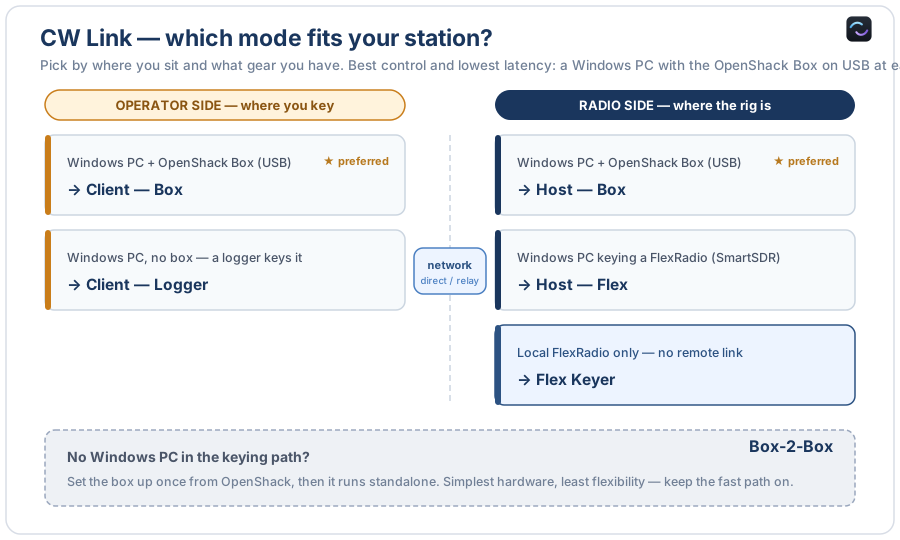
At the operator, choose a Box or logger. At the radio, choose a Box or supported FlexRadio.
Box or logger
Use a real paddle, straight key and footswitch through the Box—or let a WinKey-compatible logger provide the CW.
Box or FlexRadio
A station-side Box keys practically any rig. A Windows host can instead deliver the timing directly to a supported FlexRadio.
CW Link
Use a direct connection where available or the managed path where inbound connections are difficult. The operating workflow stays the same.
Two Boxes. CW and PTT between operator and radio.
For operators who want hardware at both ends, Box-to-Box is CW Link without a Windows PC in the keying path after setup. Audio and CAT remain with the remote system you already chose.
Key locally.
Paddle or logger in, instant sidetone out. The operator-side Box sends CW timing and footswitch PTT.
Key the station.
The second Box reproduces that timing on its CW and PTT outputs. Once configured, the pair runs independently.
From a logger to a FlexRadio.
On each PC, select the connected CW device. CW Link handles the rest.
Paddle and footswitch
The local Box supplies precise edges, immediate sidetone and physical PTT.
Software WinKey
N1MM+, Win-Test and compatible loggers can key the link through a virtual COM port, even without a local Box.
Physical radio outputs
A USB-connected Box at the station recreates CW and PTT for the rig.
SmartSDR path
The host can deliver the edge timing to a supported FlexRadio and select the transmitting SmartSDR station.
Box straight to Flex
Use a Box beside you to key a reachable FlexRadio over LAN or VPN, with no separate CW Link peer.
PC-free keying path
Configure both roles once, then let the hardware pair carry CW timing and PTT by itself.
It adds CW. It does not replace your station.
CW Link carries keying timing, PTT and the control information needed for that path. Audio and CAT remain with your existing remote system.
If you want RX/TX audio, radio control, logger integration, digital modes, waterfall, cluster and station devices together, use OpenShack Remote.
Keep your remote station. Put real CW back into it.
CW Link is included in the OpenShack Remote software and works with Box, logger and FlexRadio operating paths.