
OpenShack Box
Looking for a CW keyer? You’ve found it.
A CW training device, standalone keyer and remote operator interface in one Box. Train with a real paddle or straight key and let OpenShack CW analyze your sending. Then use the same hardware as a WinKey replacement—or for CW, PTT, footswitch and immediate sidetone in a remote station.
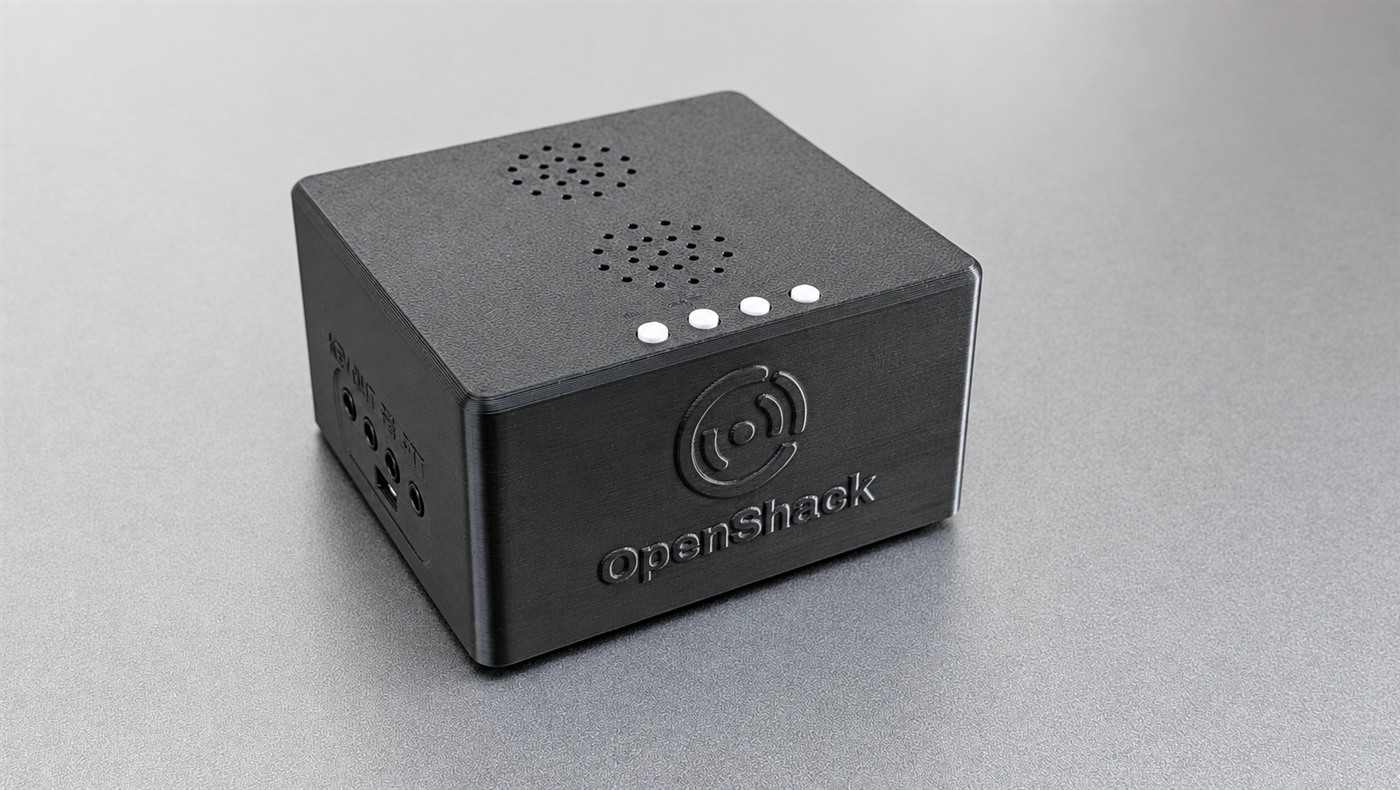
A serious training device—and your everyday keyer.
Connect a paddle or straight key and OpenShack CW can inspect what you actually send, character by character. Use the Box with RufzXP TX, TX analysis and the wider suite for callsigns, speed work, competitions and live CW practice.
When training ends, the same Box works with WinKey-compatible logging software and provides memories, speed control and sidetone without a software license. OpenShack Remote adds remote-station functions.
Keep the operator connected.
At home, the Box is a training device or replaces a WinKey. For remote operation, place it at the radio or beside the operator.
Standalone WinKey replacement
WinKey-compatible logging, iambic keying, straight-key support, memories, speed control and sidetone.
CW training device
Use a real paddle or straight key and let OpenShack CW analyze timing character by character.
Precision timing output
For CW training and precision remote CW.
The ultimate client experience
Keep paddle, immediate sidetone, footswitch and physical controls beside the remote operator.
Wireless audio
Audio can also be streamed wirelessly to the OpenShack Box via Bluetooth.
Footswitch ready
Bring physical PTT into OpenShack Remote instead of hunting for an on-screen button.
Your paddle goes mobile
Alongside USB, Bluetooth Low Energy (BLE) provides a wireless connection for WebRemote and the native Android and iOS apps. Android supports USB and BLE; iOS uses BLE. Browser connections depend on USB and Web Bluetooth support. The five CW apps and Android Remote are available in the stores; iOS Remote is awaiting its first App Store approval.
Explore mobile Remote →Browser setup
Configure and update the Box through WebConfig without a separate configuration application.
All inputs, outputs and built-in functions.
The Box is more than a paddle interface. It connects CW and PTT to the radio. It also handles station audio, local sidetone, physical controls and wired or wireless connections.
Physical inputs and outputs
- Digital inputsPaddle or straight key, plus footswitch — each on a 3.5 mm jack.
- Digital outputsCW Key and PTT on 3.5 mm jacks. Both are protected by ultra-fast CMOS electronic relays for direct connection to the transceiver. PTT lead-in, PTT tail and first-element extension are adjustable.
- Analog input3.5 mm stereo Audio In from the audio output of a PC, smartphone or tablet.
- Analog output3.5 mm headphone output with automatic detection.
- Built-in audioTwo 3 W stereo speakers reproduce station audio and the immediate hardware sidetone.
What is inside
- CW keyerIambic A, Iambic B, Ultimatic and straight-key modes from 5–100 WPM; WinKey-compatible on startup.
- SidetoneGenerated in the Box, adjustable from 550–750 Hz and mixed directly with the incoming station audio.
- ControlsDedicated Speed − / Speed + buttons and two freely assignable buttons for functions such as keyer mode, sidetone volume, tune, PTT or CW memories.
- USBMicro USB supplies 5 V power and the serial connection for OpenShack or WinKey-compatible software.
- WirelessWPA2/WPA3 WiFi with DHCP or static IP, Bluetooth audio, and Bluetooth Low Energy (BLE) for CW/PTT with BLE-capable firmware. WiFi and Bluetooth audio are used one at a time.
- SetupBrowser-based configuration and firmware updates through WebConfig.
Two Boxes. CW and PTT between operator and radio.
Put one Box beside the operator and one beside the radio. Configure the pair with CW Link. After that, the Boxes carry CW timing and PTT without a PC in the keying path.
Key here. Hear it here.
Your paddle or logger drives the local Box. Its own speaker gives immediate sidetone, and the footswitch remains under your desk.
The second Box keys the rig.
The station-side Box recreates the timing and switches CW and PTT. Your existing remote system can continue to carry audio and CAT.
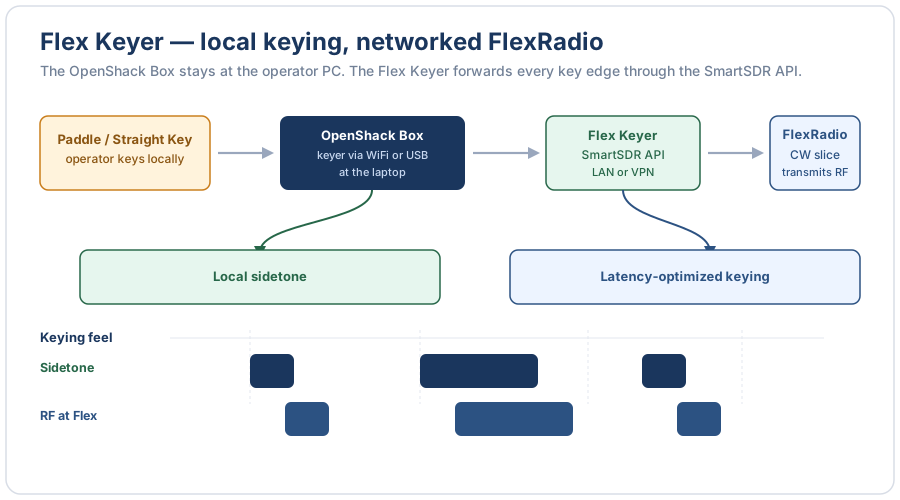
One Box beside you. Your FlexRadio anywhere.
Connect the paddle and footswitch to the local Box and hear sidetone without the network delay. Flex Keyer sends precise CW edges and PTT to a reachable FlexRadio through the SmartSDR API.
FlexRadio operators get real controls and local keying feel without adding a second Box at the station.
Put your hands back in the station.
Use the Box as a standalone keyer or with OpenShack CW. For remote operation, use it with Flex Keyer or pair it with a second Box.